শিরোনামঃ
Loading...
Showing posts with label apk download. Show all posts

মোবাইলে জ্বালাতনকারীকে সনাক্ত করার চারটি উপায়

মোবাইলে জ্বালাতনকারীকে সনাক্ত করার চারটি উপায়
  

মোবাইল ফোনের মাধ্যমে আমাদের অনেক প্রয়োজনীয়তা মিটেছে। বিশেষ করে এই ডিভাইসটির সাহায্যে খুব দ্রুত এক দেশ থেকে অন্য দেশে আমরা খোঁজ-খবর নিয়ে থাকি।
একটা সময় যখন মোবাইল ফোন ছিল না, কাউকে কোনো খবর জানাতে হলে এক মাস বা তারচেয়ে বেশি সময় প্রয়োজন হত। কারণ ওই সময় খবরের আদান-প্রদান করা হত চিঠির মাধ্যমে। এরপর ইন্টারনেট এসে সহজ হয় যোগাযোগ।
ইন্টারনেটের পরপরই আসে মোবাইল ফোন। যা আমাদের যোগাযোগকে আরো অধিকতর সহজ করেছে।
এতে শুধু মেইল বা মেসেজ নয়, অনায়াসে তার কণ্ঠ শুনে খোঁজ-খবর নিতে পারছে ব্যবহারকারীরা। এমনকি ভিডিও কলের মাধ্যমে তাকে দেখতেও পারছে তারা। তবে প্রত্যেকটা আবিষ্কারের যেমন সুবিধা রয়েছে, তেমন রয়েছে অসুবিধাও।
আপনি যখন কোনো ফোন ব্যবহার করবেন তখন আপনার নাম্বারটি সকলের কাছে পরিচিত হবে এটাই স্বাভাবিক। কিন্তু সমস্যা হল, একটি ফোন থাকা মানে সেখানে পরিচিত-অপরিচিত মানুষের কল আসা। আপনারও সেটি আসবে।
এর মাধ্যমে ফোনে অপরিচিত নম্বর এসে হয়রানির শিকারও হবেন আপনি। একটি ফোনে এমন এমন নাম্বার থেকে কল আসবে, আপনি বুঝেও উঠতে পারবেন না, কে সে? এই সময় আপনি কী করবেন?
আধুনিক সময়ে এসে তা নিয়ে ঘাবড়ানোর কোন কারণ নেই। কারণ আধুনিক প্রযুক্তির যুগে আপনি কিছু পদ্ধতি অবলম্বন করলে খুব সহজেই অপরিচিত ব্যক্তির পরিচয় জানতে পারবেন।
আর পরিচয় জানা মানে ডিস্টার্ব থেকে নিজেকে রক্ষা করা। কিন্তু কিভাবে সেটা? অনেকেই এই নিয়ম জানেন আবার অনেকেই জানেন না। আর যারা জানেন না তাদের জন্য আজকের এই লেখা। আজ আমি পাঠক বন্ধুদের জানাবো, কিভাবে খুব সহজে একজন অপরিচিত মানুষকে চিনতে পারবেন।
তবে অপরিচিত মানুষটিকে চিনতে হলে আপনার দরকার হবে একটি স্মার্ট ফোন আর তার মোবাইল নম্বর আর কিছু অ্যাপ্লিকেশন। তাহলে খুব সহজেই আপনি বের করতে পারবেন সে মানুষটিকে।
চলুন মোবাইল নাম্বার দিয়ে অপরিচিতের পরিচয় কিভাবে বের করবেন, জেনে নেয়া যাক। প্রথমে এই কাজের জন্য আপনাকে যেতে হবে গুগল প্লে-স্টোরে। সেখানে রয়েছে কিছু মোবাইল ট্র্যাকিং অ্যাপস।
এছাড়াও রয়েছে কিছু ওয়েবসাইট। এই অ্যাপ এবং সাইটগুলো মোবাইল নাম্বারটি ট্র্যাক করে, সেটি কার নাম্বার খুব সহজেই জানিয়ে দিতে পারে।
True caller (ট্রু কলার)
ট্রু কলার হলো একটি মোবাইল ট্রাকিং অ্যাপ। এর মাধ্যমে আপনি সহজেই একজন অপরিচিত মানুষকে চিনতে পারবেন। আর এই কাজের জন্য এটি খুব জনপ্রিয়। গুগল প্লে স্টোরে এই অ্যাপটি খুব সহজেই পাওয়া যায়। প্রথমে অ্যাপটি আপনি আপনার মোবাইলে ফোনে সেভ করে নিন। এরপর এটি ইন্সটল হয়ে গেলে নোটিফিকেশনের মাধ্যমে আপনাকে জানিয়ে দেবে সেটি কার নাম্বার। যদি সেই নাম্বারটা আপনার ফোনে সেভ থাকে তাও সে জানাবে, আর না থাকলেও সে জানাবে। অ্যাপটি মূলত ওয়াইফাই নেটওয়ার্ক এর মাধ্যমে নাম্বারটি ট্র্যাক করে। তাই এর জন্য আপনাকে সব সময় মোবাইলে ইন্টারনেট সংযোগ রাখতে হবে।
Whoscall (হুসকল)
হুসকল হল ট্রু কলার এর মত একটি অ্যাপ। এটি ট্রু কলারের বিকল্প অ্যাপের মধ্যে সবচেয়ে জনপ্রিয়। অ্যাপটি গুগল প্লে স্টোর এবং অ্যাপল অ্যাপ স্টোরে খুব সহজেই পাওয়া যায়। প্রথমে ঠিক আগের মত এটি মোবাইলে ইন্সটল করে নিতে হবে। এরপর একইভাবে অ্যাপটি আপনাকে অপরিচিত ব্যক্তির পরিচয় জানাতে সক্ষম হবে। এই অ্যাপটি ২০১৯ সালে প্রথম বাজারে আসে। জানা গেছে, এখনো পর্যন্ত এটি প্রায় ৭০ মিলিয়নের বেশী ডাউনলোড হয়েছে। এই অ্যাপটির সবচেয়ে বড় বিশেষত্ব হল এটি ভুয়া কলকে ব্লক করে দিতে পারে অনায়াসে।
Find and Trace (ফাইন্ড এন্ড ট্র্যাক)
ফাইন্ড এন্ড ট্র্যাক। এটি কোন অ্যাপ নয় এটি একটি ওয়েবসাইট। এই ওয়েবসাইট যে কোন নাম্বারের তথ্য বের করে দিতে পারে খুব সহজেই। শুধুমাত্র নাম্বার নয়, অজানা গাড়ির নাম্বার, অজানা ল্যান্ডলাইনের নাম্বার, অজানা পিনকোড, এসটিডি, আইএসডি কোডসহ ইত্যাদি খুঁজে বের করতে পারে এটি অনায়াসে। সাইটটিতে ঢুকে আপনার সেই মোবাইল নাম্বারটি প্রবেশ করিয়ে সার্চ বাটনে ক্লিক করতে হবে। তাহলেই আপনি সেই মোবাইলের অনেক তথ্যই পেয়ে যাবেন। তবে এই ওয়েবসাইটটিতে আপনি কলারের নাম সব সময় খুঁজে নাও পেতে পারেন। তারপরেও এই সাইটটি বেশ জনপ্রিয়তার সঙ্গে কাজ করে আসছে। আপনি চাইলে এটি ব্যবহার করে দেখতে পারেন।
Mobile Number Locator (মোবাইল নম্বর লোকেটর)
মোবাইল নম্বর লোকেটর হল একটি ট্র্যাকিং অ্যাপ। এর জনপ্রিয়তাও খুব বেশী। এই অ্যাপের সাহায্যে অচেনা নম্বর থেকে ফোনদাতার রেজিস্টার্ড নাম জানা যায় খুব সহজেই। অ্যাপটির অন্যতম সুবিধা হচ্ছে, এটি ইন্টারনেট কানেকশন ছাড়াই পরিচালনা করা যায়। ইনকামিং ও আউটগোয়িং কল চলাকালীনই কলারের ও প্রাপকের বিস্তারিত জানিয়ে দেয় এই অ্যাপটি। গুগল ম্যাপের সাহায্যে এই অ্যাপ কলারের লোকেশনও দেখিয়ে দিতে সক্ষম।
জেডআই

Green Screen Pack for MCPE

Green Screen Pack for MCPE


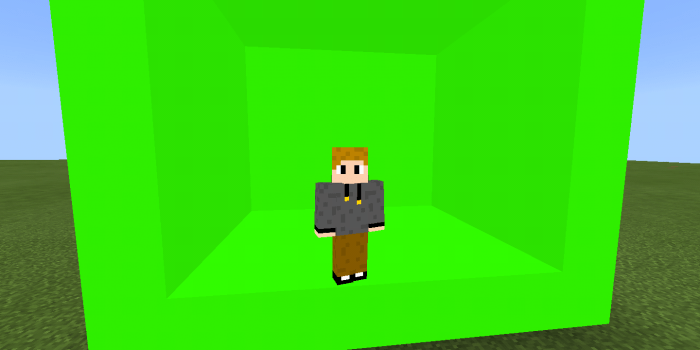
This is a texture pack for Minecraft PE that contains green screen. Green screen is very useful for effects and for more. People who like editing videos know that if someone use green screen then he / she can fill it with an image, a video, a background, or with anything else.


I used the glowstone’s texture to create a light green block. You also can use it in dark place because it’s light.
g

Installation

1. Click the link ( Green Screen.mcpack ).
2. A Mediafire site will show up. Download the pack from there.
3. Click on the file and open it with Minecraft.
4. Enjoy!

Downloads

Supported Minecraft versions

Google app 10.41 preps device notifications in Ambient Mode, Alarms in At A Glance [APK Insight]

Google app 10.41 preps device notifications in Ambient Mode, Alarms in At A Glance [APK Insight]


About APK Insight: In this ‘APK Insight’ post, we’ve decompiled the latest version of an application that Google uploaded to the Play Store. When we decompile these files (called APKs, in the case of Android apps), we’re able to see various lines of code within that hint at possible future features. Keep in mind that Google may or may not ever ship these features, and our interpretation of what they are may be imperfect. We’ll try to enable those that are closer to being finished, however, to show you how they’ll look in the case that they do ship. With that in mind, read on.

Notifications in Ambient Mode

A more feature-rich Assistant is coming to the always-on display with Ambient Mode. Besides suggestions and music controls, Google app 10.41 suggests that regular device notifications will appear. New strings detail that functionality, and enabling the notification access permission for the Google app.
<string name=”charging_mode_notification_cta”>Turn on in Settings</string>
<string name=”charging_mode_notification_title”>See your notifications while in Ambient Mode</string>
<string name=”charging_mode_notification_content”>Turn on notification access for the Google App to see your notifications while in Ambient Mode.</string>
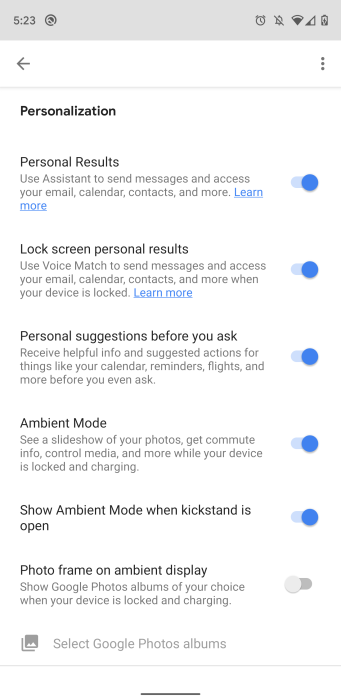
Meanwhile, we enabled the settings page to turn on/off Ambient Mode. It will be a preference under “Personalization,” alongside “Personal Results,” “Lock screen personal results,” and “Personal suggestions before you ask.” The Pixel Stand’s existing Photo frame feature will also be accessible here.
We can also see the “Show Ambient Mode when kickstand is open” option that we first spotted earlier this week. It could imply that a first-party Pixel 4 phone case with kickstand is coming.

At A Glance

In addition to Calendar events, Upcoming flight information, and Traffic information, the At A Glance widget available in the Pixel Launcher and Google app might soon note your next upcoming alarm.
<string name=”smartspace_alarm_title”>Alarm</string>
<string name=”smartspace_alarm_summary”>Next upcoming alarm alerts</stril,,

Google app browser

Google Discover and Search today leverage a Chrome Custom Tab that adds an “Add to collection” shortcut in the app bar. Google looks to be working on a separate “Google app browser” that allows users to clear cookies, cached data, and other browsing data separately from Chrome. It’s not clear how the experience would differ.

How to update?

You can sign-up for the Google app’s beta program here or by heading to the Play Store listing on Android and scrolling to the bottom. The latest beta version of the Google app is immediately rolled out when it’s available.
Thanks to JEB Decompiler, which some APK Insight teardowns benefit from.
Dylan Roussel contributed to this article

Google Maps details upcoming navigation turns in refreshed UI [APK Download]

Google Maps details upcoming navigation turns in refreshed UI [APK Download]
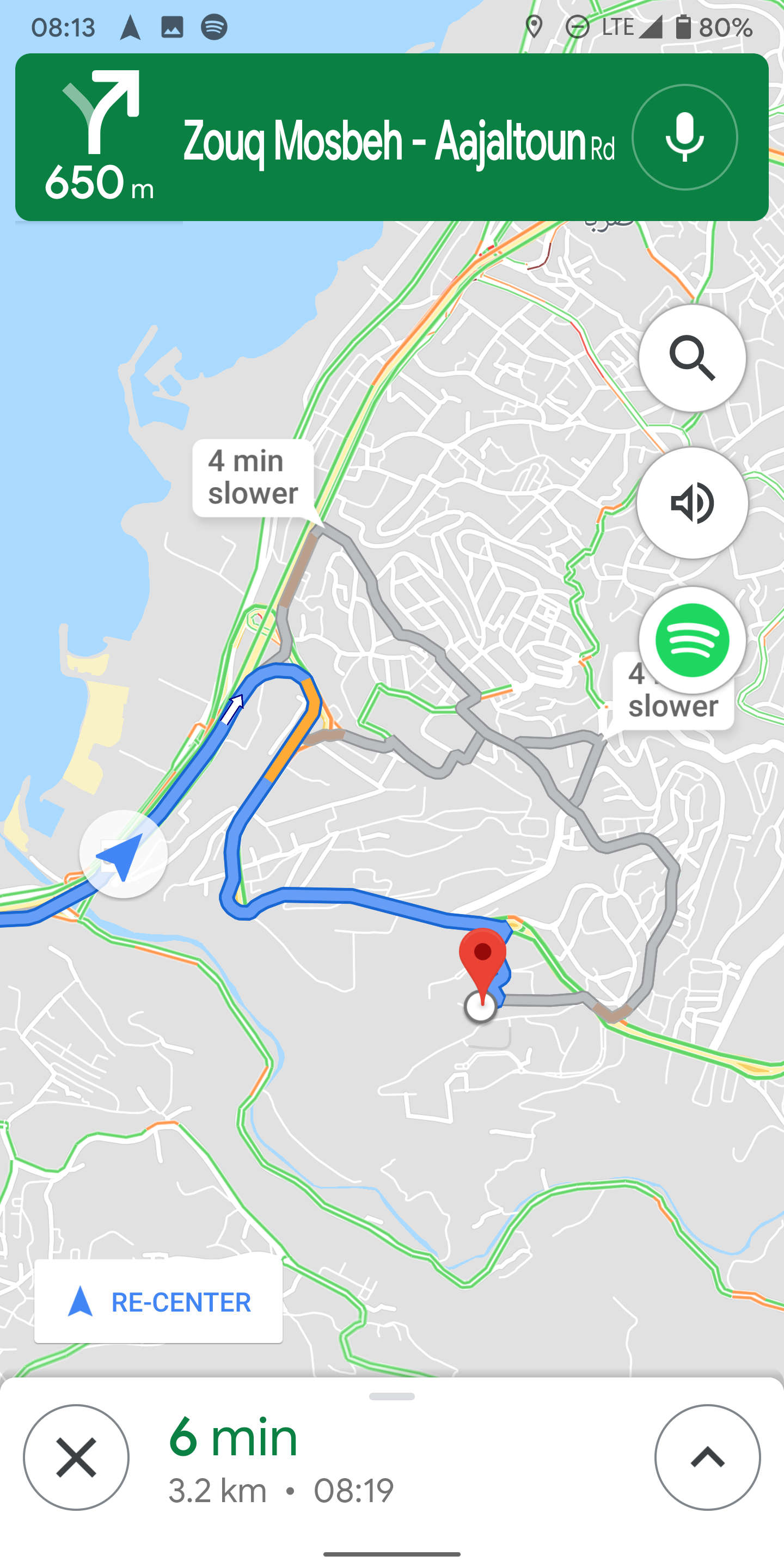
isual update, there's also a functional improvement: you can now tap to see upcoming steps and turns in your drive.
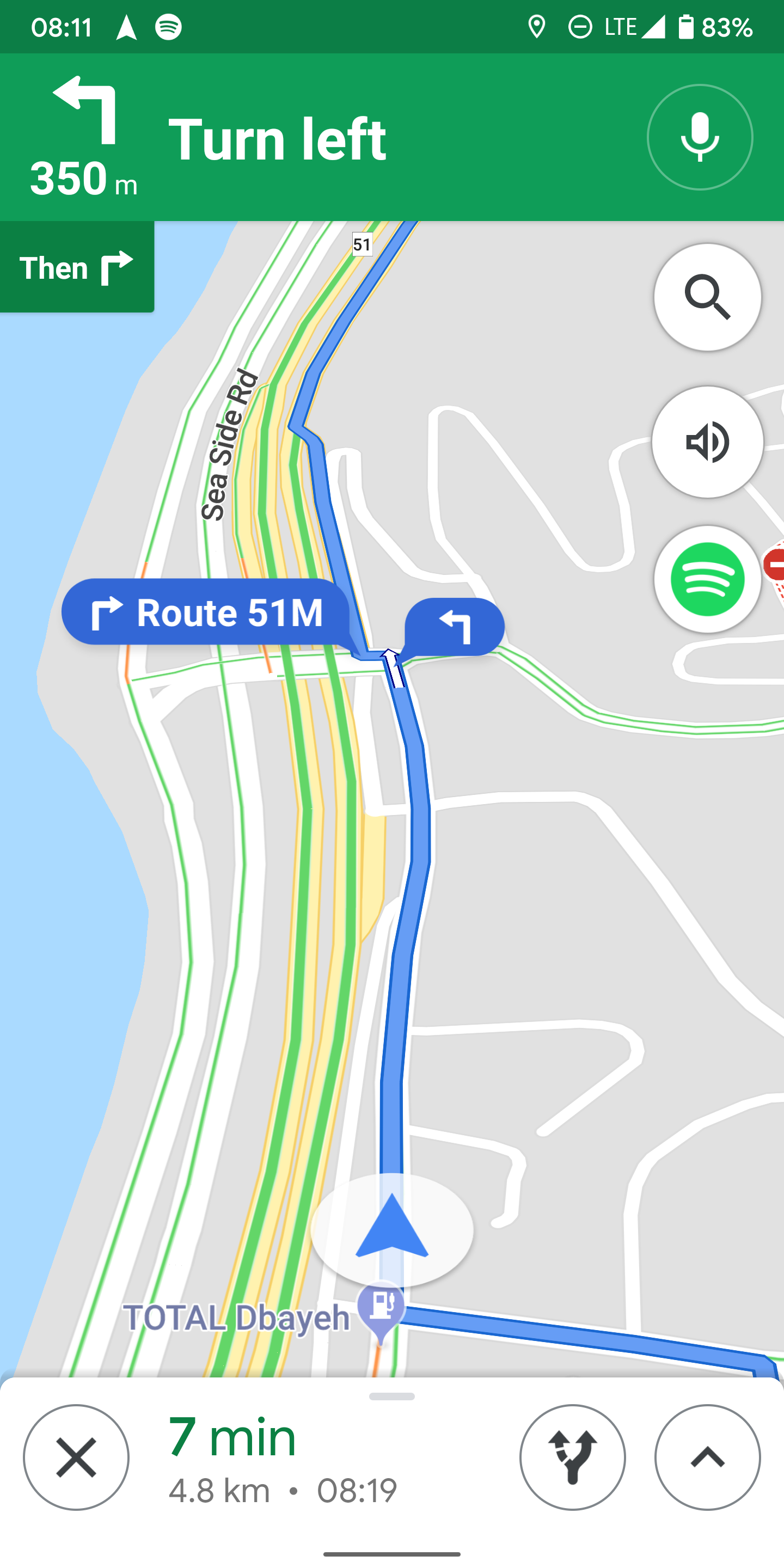
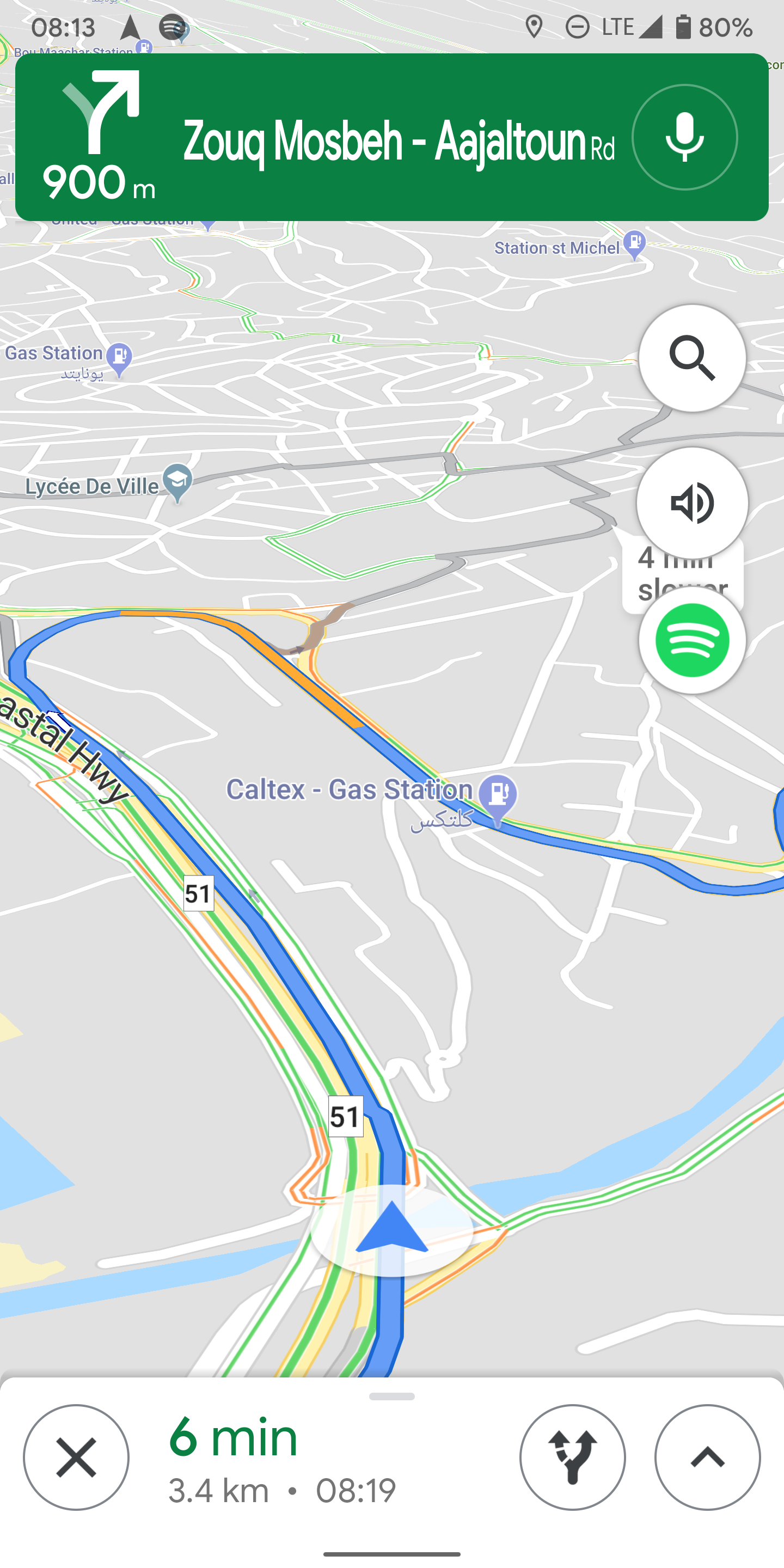
Instead of the edge-to-edge green banner on top that shows the next step, there's now a darker green floating rectangle with rounded corners. The font is also changed, though I'm not a huge fan. It's still way too big and looks a little cramped in some instances, but maybe that's better for readability when driving.
Left: Old UI. Right: New UI.
Tapping the green banner didn't do anything before, but now it expands to show one or two upcoming turns or steps. There's also a more user-friendly "Show routes" button. It's a duplicate of the button you find in the bottom white bar while navigating, but the labeling helps in knowing what it does.
Left: New UI expanded. Right: Showing all routes.
To get this new interface, you need to be running version 10.22.1 of Maps, which is available on the Play Store as well as APK Mirror.
  • Thanks: 
  • Michael Zhonga, 
  • Nick Cipriani